📓 Interactive Notebook: Advanced Data Manipulation with Pandas & Seaborn

Welcome! This notebook is the hands-on component of our 1-hour session: "Advanced Data Manipulation & EDA with Pandas: Preprocessing for Machine Learning".
🎯 Learning Objectives
By the end of this notebook, you will be able to:
- Clean and prepare data for machine learning models (handling missing values, de-duplication, data type casting).
- Encode categorical features into numerical representations (
One-Hot EncodingandOrdinal Mapping). - Perform advanced filtering and row transformations using boolean indexing, lambda functions, and vectorized NumPy functions.
- Integrate multiple data sources using database-style merges (
pd.merge). - Perform GroupBy aggregations and transforms (
Split-Apply-Combine) to engineer group-level features. - Perform Exploratory Data Analysis (EDA) and visualize distributions, outliers, and feature correlations using Seaborn.
- Extract numerical features from datetime columns and build time-series features (lags, leads, rolling averages).
🧠 Understanding the Ecosystem: Pandas Internals & Modern Alternates
Before we write code, let's look at how Pandas works under the hood and why the industry is adopting newer data tools as dataset sizes scale.
1. Pandas Internals: The Constraints
- In-Memory Design: Pandas is designed to load your entire dataset into RAM. A common rule of thumb is that you need 5x to 10x the size of your dataset in RAM to perform transformations without running out of memory (OOM crashes).
- Single-Core / Single-Threaded: The core engine of Pandas (built on top of older NumPy versions) runs on a single CPU core. Even if your computer has 8 or 16 cores, Pandas will leave 90%+ of your processor power idle during a long computation.
2. Modern Alternates for Big Data & ML Pipelines
When datasets grow beyond 10GB, loading them in Pandas becomes a bottleneck. Two major engines are changing how we do feature engineering for ML:
Polars (Written in Rust):
- Multi-Threaded: Parallelizes execution across all available CPU cores by default.
- Lazy Evaluation: Instead of executing every line of code immediately (eagerly), Polars builds a query plan and optimizes it (e.g., combining filters, skipping unused columns) before processing the data.
- Streaming: Can process data in chunks (out-of-core), allowing you to run operations on datasets larger than your physical RAM.
DuckDB (In-Process Columnar SQL):
- Vectorized Query Engine: Processes data in columns rather than rows, which is extremely fast for analytical aggregations.
- Serverless: Runs directly inside your Python process (like SQLite but optimized for analytics).
- Pandas Integration: DuckDB can query Pandas DataFrames or Parquet files directly using SQL without copying the data, making it an excellent tool for joining massive tables before feeding clean arrays to machine learning models.
# 💻 Step 1: Import core packages and print versions
import pandas as pd
import numpy as np
import seaborn as sns
import matplotlib as mpl
import matplotlib.pyplot as plt

# Set style for plots
sns.set_theme(style="whitegrid")
plt.rcParams["figure.figsize"] = (10, 6)

print("Libraries imported successfully!")
print(f"Pandas version:     {pd.__version__}")
print(f"NumPy version:      {np.__version__}")
print(f"Seaborn version:    {sns.__version__}")
print(f"Matplotlib version: {mpl.__version__}")
Libraries imported successfully!
Pandas version:     3.0.0
NumPy version:      2.4.1
Seaborn version:    0.13.2
Matplotlib version: 3.10.8
🛠️ Step 2: Synthetic Data Generation
To make this notebook completely self-contained and realistic, we will generate a synthetic e-commerce dataset. This dataset simulates retail transactions and customer profiles, complete with missing values (NaNs), duplicate records, string variables, and raw dates.
Colab Tip: Because this dataset is generated in-memory, you do not need to upload any external CSV files or mount Google Drive to run this notebook!
# Seed for reproducibility
np.random.seed(42)
n_samples = 200

# 1. Create Customer Profiles DataFrame
customers_data = {
    'customer_id': [f"CUST_{i:03d}" for i in range(1, 51)],
    'age': np.random.choice([22, 28, 35, 42, 50, np.nan], size=50, p=[0.2, 0.2, 0.2, 0.2, 0.1, 0.1]), # Injecting NaNs
    'gender': np.random.choice(['M', 'F', 'Other'], size=50),
    'membership': np.random.choice(['Bronze', 'Silver', 'Gold'], size=50, p=[0.5, 0.3, 0.2]),
    'signup_date': pd.date_range(start='2025-01-01', periods=50, freq='d')
}
df_customers = pd.DataFrame(customers_data)

# 2. Create Transactions DataFrame
tx_dates = pd.date_range(start='2026-01-01', periods=n_samples, freq='h')
transactions_data = {
    'transaction_id': [f"TX_{i:04d}" for i in range(1, n_samples + 1)],
    'customer_id': np.random.choice(df_customers['customer_id'], size=n_samples),
    'timestamp': tx_dates,
    'amount': np.random.normal(loc=120, scale=40, size=n_samples).round(2),
    'category': np.random.choice(['Electronics', 'Clothing', 'Books', np.nan], size=n_samples, p=[0.4, 0.4, 0.15, 0.05]), # Injecting NaNs
    'is_fraud': np.random.choice([0, 1], size=n_samples, p=[0.95, 0.05]) # Imbalanced target variable
}
df_transactions = pd.DataFrame(transactions_data)

# Inject some duplicate rows into transactions
duplicates = df_transactions.iloc[10:15]
df_transactions = pd.concat([df_transactions, duplicates], ignore_index=True)

print(f"Transactions dataset generated. Shape: {df_transactions.shape}")
print(f"Customers dataset generated. Shape: {df_customers.shape}")
Transactions dataset generated. Shape: (205, 6)
Customers dataset generated. Shape: (50, 5)
C:\Users\aakashkhandelwal\AppData\Local\Temp\ipykernel_18864\1921948098.py:11: Pandas4Warning: 'd' is deprecated and will be removed in a future version, please use 'D' instead.
  'signup_date': pd.date_range(start='2025-01-01', periods=50, freq='d')
🧹 Step 3: Data Cleaning & Pre-ML Formatting
Before training models in Scikit-Learn, we must clean our data. If the data contains missing values (NaN) or duplicate rows, training will either crash or suffer from data leakage. Let's clean it.
# 1. Check for Duplicate Rows
dup_count = df_transactions.duplicated().sum()
print(f"Number of duplicate rows in transactions: {dup_count}")

# Remove duplicates
df_transactions = df_transactions.drop_duplicates(keep='first')
print(f"Shape after removing duplicates: {df_transactions.shape}")

# 2. Check for Missing Values
print("\nMissing values in customer profiles:")
print(df_customers.isnull().sum())

# Impute missing Customer Age with the Median
median_age = df_customers['age'].median()
df_customers['age'] = df_customers['age'].fillna(median_age)
print(f"\nImputed missing age with median age: {median_age}")
print(f"Missing age counts after imputation: {df_customers['age'].isnull().sum()}")
Number of duplicate rows in transactions: 5
Shape after removing duplicates: (200, 6)

Missing values in customer profiles:
customer_id    0
age            5
gender         0
membership     0
signup_date    0
dtype: int64

Imputed missing age with median age: 28.0
Missing age counts after imputation: 0
🏷️ Step 4: Categorical Encoding
Machine Learning algorithms require numerical input. String classes like "Bronze" or "F" cannot be used in formulas directly. We will convert them.
# 1. Ordinal Encoding (Mapping ranked data to numerical scale)
membership_map = {'Bronze': 0, 'Silver': 1, 'Gold': 2}
df_customers['membership_encoded'] = df_customers['membership'].map(membership_map)

# 2. One-Hot Encoding (Creating dummy variables for nominal features)
# We drop the first column using drop_first=True to avoid the dummy variable trap (collinearity)
df_customers_encoded = pd.get_dummies(df_customers, columns=['gender'], drop_first=True)

print("Sample of encoded customer profiles:")
df_customers_encoded[['customer_id', 'membership', 'membership_encoded', 'gender_M', 'gender_Other']].head()
Sample of encoded customer profiles:
| customer_id | membership | membership_encoded | gender_M | gender_Other | |
|---|---|---|---|---|---|
| 0 | CUST_001 | Bronze | 0 | False | True |
| 1 | CUST_002 | Silver | 1 | False | False |
| 2 | CUST_003 | Silver | 1 | False | False |
| 3 | CUST_004 | Gold | 2 | False | False |
| 4 | CUST_005 | Bronze | 0 | False | False |
💡 Advanced Tip: Memory Optimization with Categoricals
When preparing large datasets for machine learning, memory efficiency is key. By default, Pandas reads string columns as object data types, which are memory-heavy. Casting them to category types significantly compresses memory usage. Let's audit this using .info(memory_usage='deep').
# Check memory usage of string categories before optimization
print("--- Memory before category type-casting ---")
df_customers[['membership', 'gender']].info(memory_usage='deep')

# Cast to category type
df_mem_opt = df_customers.copy()
df_mem_opt['membership'] = df_mem_opt['membership'].astype('category')
df_mem_opt['gender'] = df_mem_opt['gender'].astype('category')

print("\n--- Memory after category type-casting ---")
df_mem_opt[['membership', 'gender']].info(memory_usage='deep')
--- Memory before category type-casting ---
<class 'pandas.DataFrame'>
RangeIndex: 50 entries, 0 to 49
Data columns (total 2 columns):
 #   Column      Non-Null Count  Dtype
---  ------      --------------  -----
 0   membership  50 non-null     str
 1   gender      50 non-null     str
dtypes: str(2)
memory usage: 1.3 KB

--- Memory after category type-casting ---
<class 'pandas.DataFrame'>
RangeIndex: 50 entries, 0 to 49
Data columns (total 2 columns):
 #   Column      Non-Null Count  Dtype
---  ------      --------------  -----
 0   membership  50 non-null     category
 1   gender      50 non-null     category
dtypes: category(2)
memory usage: 305.0 bytes
🔍 Step 5: Advanced Filtering & Custom Feature Engineering
Let's explore how to filter rows and engineer custom columns using standard filters, lambdas, and vectorized NumPy tools.
# 1. Filtering using bitwise operators
high_value_electronics = df_transactions[
    (df_transactions['category'] == 'Electronics') & (df_transactions['amount'] > 150)
]

# 2. Row-wise Transformation using lambda & .apply()
# (Creating a category-based premium flag)
df_transactions['premium_fee'] = df_transactions.apply(
    lambda row: row['amount'] * 0.05 if row['category'] == 'Electronics' else row['amount'] * 0.02,
    axis=1
)

# 3. Fast Vectorized Categorization using np.where() and np.select()
# Create an binary indicator column
df_transactions['is_high_value'] = np.where(df_transactions['amount'] > 150, 1, 0)

# Create multi-class categorical columns
conditions = [
    df_transactions['amount'] < 80,
    (df_transactions['amount'] >= 80) & (df_transactions['amount'] < 150),
    df_transactions['amount'] >= 150
]
choices = ['Low_Spend', 'Medium_Spend', 'High_Spend']
df_transactions['spend_group'] = np.select(conditions, choices, default='Unknown')

df_transactions[['transaction_id', 'amount', 'category', 'premium_fee', 'is_high_value', 'spend_group']].head()
| transaction_id | amount | category | premium_fee | is_high_value | spend_group | |
|---|---|---|---|---|---|---|
| 0 | TX_0001 | 47.92 | Electronics | 2.3960 | 0 | Low_Spend |
| 1 | TX_0002 | 138.71 | Electronics | 6.9355 | 0 | Medium_Spend |
| 2 | TX_0003 | 57.94 | Electronics | 2.8970 | 0 | Low_Spend |
| 3 | TX_0004 | 99.58 | Electronics | 4.9790 | 0 | Medium_Spend |
| 4 | TX_0005 | 90.68 | Books | 1.8136 | 0 | Medium_Spend |
🤝 Step 6: Integrating Data Sources
In real-world analytics, we need to join transaction event tables with user feature tables to train classification or regression models. We do this using pd.merge().
# SQL-style Left Join to attach customer features to transaction records
df_merged = pd.merge(df_transactions, df_customers_encoded, on='customer_id', how='left')

print(f"Merged DataFrame Shape: {df_merged.shape}")
print("Merged columns:")
print(df_merged.columns.tolist())
df_merged[['transaction_id', 'customer_id', 'amount', 'age', 'membership_encoded', 'gender_M']].head()
Merged DataFrame Shape: (200, 15)
Merged columns:
['transaction_id', 'customer_id', 'timestamp', 'amount', 'category', 'is_fraud', 'premium_fee', 'is_high_value', 'spend_group', 'age', 'membership', 'signup_date', 'membership_encoded', 'gender_M', 'gender_Other']
| transaction_id | customer_id | amount | age | membership_encoded | gender_M | |
|---|---|---|---|---|---|---|
| 0 | TX_0001 | CUST_032 | 47.92 | 22.0 | 2 | False |
| 1 | TX_0002 | CUST_032 | 138.71 | 22.0 | 2 | False |
| 2 | TX_0003 | CUST_024 | 57.94 | 28.0 | 0 | False |
| 3 | TX_0004 | CUST_041 | 99.58 | 22.0 | 0 | False |
| 4 | TX_0005 | CUST_049 | 90.68 | 35.0 | 0 | False |
📊 Step 6.5: GroupBy and Aggregations (Split-Apply-Combine)
Aggregating customer features or transaction behaviors is crucial for model inputs (e.g., calculating user-level statistics or normalizing purchase amounts by membership level).
# 1. Basic grouping and mean calculation
group_means = df_merged.groupby('membership')['amount'].mean()
print("Mean transaction amount by membership level:")
print(group_means)

# 2. Multi-column aggregation using .agg()
agg_results = df_merged.groupby('membership').agg({
    'amount': ['mean', 'max', 'std'],
    'age': 'median'
})
print("\nMulti-metric aggregations:")
print(agg_results)

# 3. Advanced Feature Engineering using .transform()
# (Subtracting group mean to center the purchase amount per customer tier)
df_merged['amount_diff_tier_mean'] = df_merged['amount'] - df_merged.groupby('membership')['amount'].transform('mean')
df_merged[['customer_id', 'membership', 'amount', 'amount_diff_tier_mean']].head()
Mean transaction amount by membership level:
membership
Bronze    113.059903
Gold      123.339535
Silver    123.535741
Name: amount, dtype: float64

Multi-metric aggregations:
                amount                       age
                  mean     max        std median
membership
Bronze      113.059903  205.73  42.116029   28.0
Gold        123.339535  204.52  41.723574   28.0
Silver      123.535741  247.48  46.608314   28.0
| customer_id | membership | amount | amount_diff_tier_mean | |
|---|---|---|---|---|
| 0 | CUST_032 | Gold | 47.92 | -75.419535 |
| 1 | CUST_032 | Gold | 138.71 | 15.370465 |
| 2 | CUST_024 | Bronze | 57.94 | -55.119903 |
| 3 | CUST_041 | Bronze | 99.58 | -13.479903 |
| 4 | CUST_049 | Bronze | 90.68 | -22.379903 |
📅 Step 7: Dates and Time Series Preprocessing
Timestamps must be parsed and split into numerical factors to enable machine learning models to capture temporal trends. Additionally, we will construct lagged features (previous values) and rolling average features.
# 1. Parse dates and extract numerical features
df_merged['timestamp'] = pd.to_datetime(df_merged['timestamp'])
df_merged['hour'] = df_merged['timestamp'].dt.hour
df_merged['day_of_week'] = df_merged['timestamp'].dt.dayofweek
df_merged['is_weekend'] = np.where(df_merged['day_of_week'] >= 5, 1, 0)

# 2. Build Time Series Shift Features (Lag/Lead)
# For timeline alignment, we set index to timestamp and sort it
df_ts = df_merged.set_index('timestamp').sort_index()

# Lag features (creating features from past hours)
df_ts['lag_amount_1h'] = df_ts['amount'].shift(1)
df_ts['lag_amount_2h'] = df_ts['amount'].shift(2)

# Lead feature (creating target column for tomorrow's prediction)
df_ts['target_lead_1h'] = df_ts['amount'].shift(-1)

# 3. Rolling Window Aggregations (Smoothing trends)
df_ts['rolling_mean_3h'] = df_ts['amount'].rolling(window=3).mean()

# Drop boundary NaNs generated by shifting
df_ts = df_ts.dropna(subset=['lag_amount_1h', 'lag_amount_2h', 'target_lead_1h', 'rolling_mean_3h'])

df_ts[['amount', 'lag_amount_1h', 'lag_amount_2h', 'target_lead_1h', 'rolling_mean_3h']].head()
| amount | lag_amount_1h | lag_amount_2h | target_lead_1h | rolling_mean_3h | |
|---|---|---|---|---|---|
| timestamp | |||||
| 2026-01-01 02:00:00 | 57.94 | 138.71 | 47.92 | 99.58 | 81.523333 |
| 2026-01-01 03:00:00 | 99.58 | 57.94 | 138.71 | 90.68 | 98.743333 |
| 2026-01-01 04:00:00 | 90.68 | 99.58 | 57.94 | 127.81 | 82.733333 |
| 2026-01-01 05:00:00 | 127.81 | 90.68 | 99.58 | 97.76 | 106.023333 |
| 2026-01-01 06:00:00 | 97.76 | 127.81 | 90.68 | 114.89 | 105.416667 |
🧠 Challenge Exercise: Volatility Tracking
Can you calculate a 14-day rolling standard deviation of the transaction amount to measure price volatility over time?
Write your code in the cell below. When you are done, you can double-click the Solution markdown cell below to reveal the answer!
# Write your code here to calculate 14-day rolling standard deviation:
# Hint: use .rolling() with a window parameter of '14d' or 14 on the datetime-indexed df_ts
🔍 Click here to see the Solution!
Reveal Code
# Calculate a 14-day rolling standard deviation
df_ts['rolling_std_14d'] = df_ts['amount'].rolling(window='14d').std()
print(df_ts[['amount', 'rolling_std_14d']].head(10))
📊 Step 8: Exploratory Data Analysis & Seaborn Visualizations
Before building models, we inspect our features and targets. Here, we address three critical preprocessing checkpoints:
- Target Class Imbalance & The Accuracy Paradox: We count target occurrences with
value_counts(normalize=True). If a dataset is heavily imbalanced (e.g., 99% legitimate, 1% fraud), a model that simply predicts 'Legitimate' for everything will have 99% accuracy, but fails to catch any fraud. This is the Accuracy Paradox; it warns us to use Precision, Recall, F1-Score, and ROC-AUC metrics instead of simple accuracy during evaluation in the next class. - Outlier Detection: We use boxplots to inspect ranges. Outliers skew models that minimize squared errors, so we must identify them (noting that boxplot whiskers extend to the minimum and maximum of the non-outlier data points, while outliers are plotted as individual points beyond).
- Collinearity Check: We plot correlation matrices to identify redundant features.
# 1. Target Imbalance Analysis
fraud_dist = df_ts['is_fraud'].value_counts(normalize=True) * 100
print("Fraud (Target) distribution (%):")
print(fraud_dist.round(2))

# Create subplots
fig, axes = plt.subplots(1, 2, figsize=(16, 6))

# Boxplot for Outlier Detection across Groups
sns.boxplot(
    data=df_ts,
    x='membership',
    y='amount',
    hue='is_fraud',
    palette='muted',
    ax=axes[0]
)
axes[0].set_title("Transaction Amounts by Membership & Fraud Status")
axes[0].set_xlabel("Membership Level")
axes[0].set_ylabel("Amount ($)")

# Correlation Heatmap for Feature Selection (Checking collinear features)
# Isolating numeric variables
numeric_cols = df_ts.select_dtypes(include=[np.number]).columns.tolist()
# Drop ID indices and constants from correlation inspection
cols_to_corr = [col for col in numeric_cols if col not in ['is_high_value']]
corr_matrix = df_ts[cols_to_corr].corr()

sns.heatmap(
    corr_matrix,
    annot=True,
    cmap='coolwarm',
    fmt='.2f',
    linewidths=0.5,
    ax=axes[1]
)
axes[1].set_title("Correlation Matrix for Feature Selection")

plt.tight_layout()
plt.show()
Fraud (Target) distribution (%):
is_fraud
0    95.94
1     4.06
Name: proportion, dtype: float64

🚀 Step 9: Scikit-Learn Handover Split ($X$ and $y$)
To conclude the session, let's perform the final step: splitting the clean DataFrame into a feature matrix $X$ and a target vector $y$, ready to be passed directly to scikit-learn estimators.
# Drop ID labels and string/date objects that are not encoded
features_to_drop = [
    'transaction_id',
    'customer_id',
    'category', # Raw string categorical - encoded counterpart is needed if we kept it
    'membership', # Raw string categorical - encoded counterpart is membership_encoded
    'signup_date', # Raw datetime string
    'is_fraud', # Target label must be dropped from feature space X
    'target_lead_1h', # Target label for regression forecasting
    'spend_group' # Created for demonstration - dropping to keep X numerical
]

# Split into Feature Matrix X and Target vector y
X = df_ts.drop(columns=features_to_drop)
y = df_ts['is_fraud'] # Binary target for classification

print("--- Final Preprocessed Shapes for Scikit-Learn ---")
print(f"Feature Matrix X Shape: {X.shape} (Rows, Features)")
print(f"Target Vector y Shape: {y.shape} (Rows,)")
print("\nFeatures list (X):")
print(X.columns.tolist())
print("\nFirst 3 rows of feature matrix X:")
X.head(3)
--- Final Preprocessed Shapes for Scikit-Learn ---
Feature Matrix X Shape: (197, 14) (Rows, Features)
Target Vector y Shape: (197,) (Rows,)

Features list (X):
['amount', 'premium_fee', 'is_high_value', 'age', 'membership_encoded', 'gender_M', 'gender_Other', 'amount_diff_tier_mean', 'hour', 'day_of_week', 'is_weekend', 'lag_amount_1h', 'lag_amount_2h', 'rolling_mean_3h']

First 3 rows of feature matrix X:
| amount | premium_fee | is_high_value | age | membership_encoded | gender_M | gender_Other | amount_diff_tier_mean | hour | day_of_week | is_weekend | lag_amount_1h | lag_amount_2h | rolling_mean_3h | |
|---|---|---|---|---|---|---|---|---|---|---|---|---|---|---|
| timestamp | ||||||||||||||
| 2026-01-01 02:00:00 | 57.94 | 2.8970 | 0 | 28.0 | 0 | False | True | -55.119903 | 2 | 3 | 0 | 138.71 | 47.92 | 81.523333 |
| 2026-01-01 03:00:00 | 99.58 | 4.9790 | 0 | 22.0 | 0 | False | True | -13.479903 | 3 | 3 | 0 | 57.94 | 138.71 | 98.743333 |
| 2026-01-01 04:00:00 | 90.68 | 1.8136 | 0 | 35.0 | 0 | False | True | -22.379903 | 4 | 3 | 0 | 99.58 | 57.94 | 82.733333 |
🏆 Step 10: Advanced Best Practices & Pandas 3.0 Roadmap
Let's review core best practices to write high-performance code, followed by an overview of what is changing in Pandas 3.0.
1. Pandas Performance Best Practices
Vectorization > Apply > Loops:
- Avoid using Python
forloops or row-wise.apply(axis=1)where possible. They are slow because they execute Python code for every row. - Use vectorized operations (built-in Pandas operations or NumPy functions like
np.where()). These execute compiled C code under the hood.
- Avoid using Python
Method Chaining:
Instead of writing multiple lines and creating temporary variables (which bloat RAM), wrap your operations in parentheses and chain them:
df_clean = (
    df.drop_duplicates()
      .fillna({'age': df['age'].median()})
      .query("amount > 10")
)
This makes code highly readable and memory efficient.
Avoiding
SettingWithCopyWarning:- This warning occurs when you assign values using chained indexing, e.g.,
df[df['age'] > 30]['name'] = 'Adult'. - Always use
.locfor assignment:df.loc[df['age'] > 30, 'name'] = 'Adult'to ensure you are modifying the original DataFrame in-place.
- This warning occurs when you assign values using chained indexing, e.g.,
Read/Write Efficiency (Parquet > CSV):
- CSV is a text format; loading it requires Pandas to guess data types, which is slow and memory-intensive.
- Use Parquet (
.to_parquet(),pd.read_parquet()). Parquet is a binary columnar format that preserves schemas/data types, compresses data, and loads up to 10x faster than CSVs.
Memory Reclamation:
- In RAM-constrained cloud environments (like Google Colab), explicitly delete massive intermediate DataFrames and call the Python garbage collector to reclaim memory:
import gc
del large_temporary_df
gc.collect()
- In RAM-constrained cloud environments (like Google Colab), explicitly delete massive intermediate DataFrames and call the Python garbage collector to reclaim memory:
🚀 The Roadmap: What's New in Pandas 3.0?
Pandas 3.0 represents a major architectural upgrade, resolving several historical memory and execution speed limitations:
PyArrow Backend by Default:
- Historically, Pandas used NumPy as its backend. Strings were stored as heavy Python
objecttypes. - Pandas 3.0 transitions string and data type storage to PyArrow by default. This leads to 10x faster string operations, drastically lower memory footprints, and native support for missing values across all data types (no more converting integers to floats just because there is a missing NaN value).
- Historically, Pandas used NumPy as its backend. Strings were stored as heavy Python
Copy-on-Write (CoW) Active by Default:
- In Pandas 3.0, Copy-on-Write is enabled by default. Under CoW, any DataFrame derived from another sharing the same memory will only copy data when a modification is actually made.
- This completely eliminates the confusing
SettingWithCopyWarningand prevents accidental deep copies of large arrays, yielding significant speed and memory gains.
Improved Type Safety & Deprecations:
- Pandas 3.0 deprecates many legacy keyword arguments and enforces strict schema validations to clean up the API, making it more robust and aligned with standard data engineering pipelines.
🎉 Congratulations!
You have completed the Advanced Pandas & Seaborn masterclass. You are now equipped with advanced data preprocessing techniques, ready to write high-performance code, and prepared for the upcoming Scikit-Learn classical Machine Learning class!
📚 Appendix: Computer Architecture & Data Engineering 101
Understanding hardware-level execution helps explain why modern libraries like Polars and DuckDB outperform legacy tools. Here is a practical reference guide covering CPU internals, data engineering paradoxes, and hardware latency.
🧱 Part 1: CPU Internals (Cores, Threads, Concurrency, and Parallelism)
🧩 Cores vs. Threads: The Hardware Basics
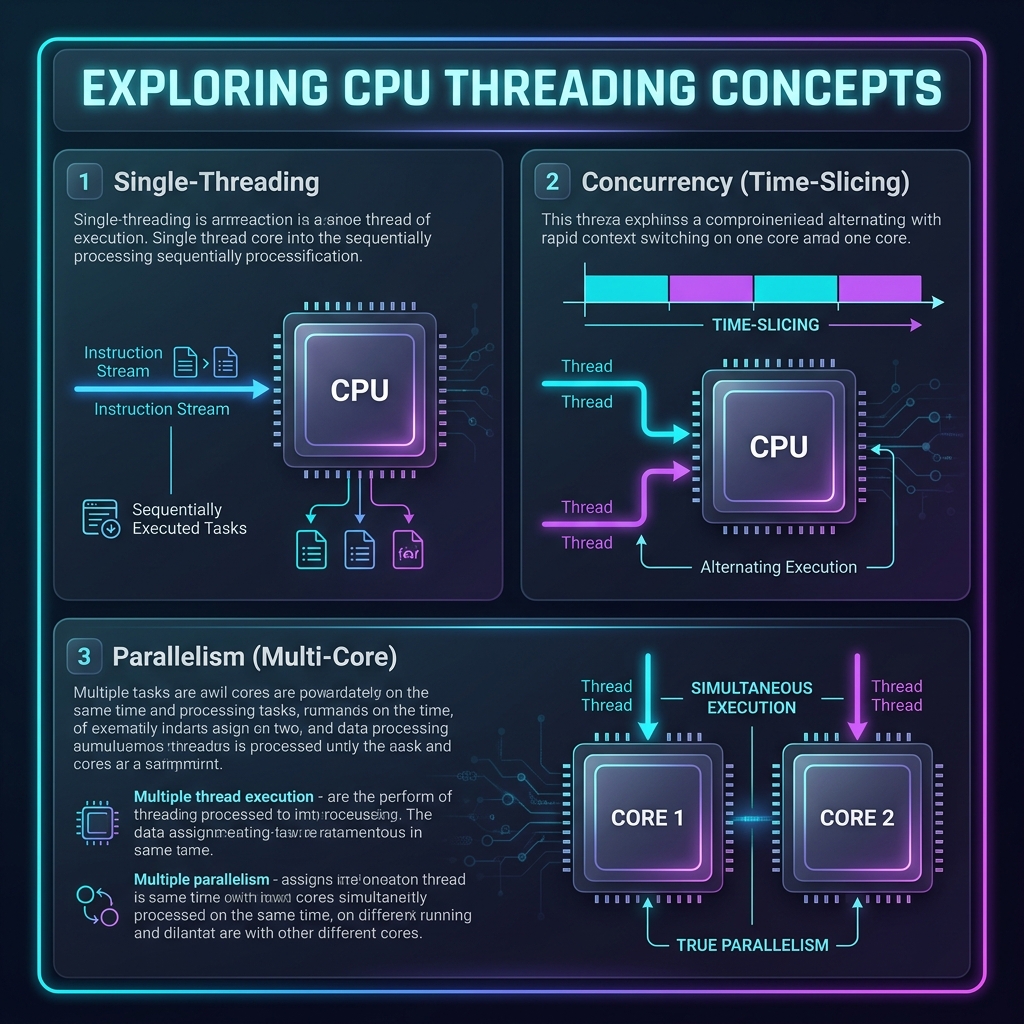
- Core: A physical, independent hardware processor inside the CPU that executes instructions.
- Thread: A virtual sequence of instructions executed by software. A single core can manage multiple threads, but multi-threading does not automatically translate to simultaneous multi-core utilization.
🍽️ The Restaurant Analogy
| Concept | What It Is | Restaurant Analogy |
|---|---|---|
| Core | Physical hardware processor inside the CPU. | A physical chef working in the kitchen. |
| Thread | A stream of tasks executed by software. | A recipe/order ticket that needs to be prepared. |
| Single-Threading | One task is executed at a time. | One chef working on exactly one order from start to finish. |
| Multi-Threading | Multiple tasks are executed concurrently. | One chef juggling multiple orders (e.g. chopping vegetables for Order B while waiting for Order A's water to boil). |
| Multi-Core Processing | Multiple physical processors execute tasks at the same time. | Multiple chefs working simultaneously on different orders. |
⏱️ Concurrency vs. Parallelism
- Concurrency (Multitasking Structure): Managing multiple tasks by starting, running, and completing them in overlapping time frames. Concurrency is about structure.
- Parallelism (Simultaneous Execution): Executing multiple tasks at the exact same physical millisecond. Parallelism is about execution.
How Software Meets Hardware:
- Time-Slicing (Concurrency on Single Core): If you run a multi-threaded program on a single-core CPU, the CPU rapidly switches back and forth between threads. To a human, they appear to run simultaneously, but the core is executing only one instruction at a time.
- True Parallelism (Multi-Core Execution): If you run a multi-threaded program on a multi-core CPU, different physical cores can execute different threads at the exact same physical millisecond.
🐍 Python's Execution Limit: The GIL
Standard Python (CPython) uses a Global Interpreter Lock (GIL).
- The Constraint: The GIL ensures that only one thread executes Python bytecode at a time, even if your machine has 16 or 32 cores.
- CPU-Bound Tasks: For data processing and numerical computations (which happen in Python space), standard Python multi-threading will not speed up your code.
- I/O-Bound Tasks: Multi-threading is highly effective for tasks where the CPU is idle, such as downloading files, fetching web pages (scraping), or writing to disk.
- Hyper-Threading: A hardware-level feature (Intel/AMD) that allows a single core to hold two threads in its pipeline at once, switching between them instantly if one thread is stalled (e.g., waiting to fetch data from RAM).
⚙️ Execution Models compared: Pandas, Polars & DuckDB
| Framework | Threading Model | Core Utilization | Underlying Engine |
|---|---|---|---|
| Pandas | Single-threaded by default. | Utilizes 1 core (unless calling pre-compiled NumPy C-libraries). | Python/C, restricted by the Global Interpreter Lock (GIL). |
| Polars | Multi-threaded by default. | Spreads workloads across all available CPU cores. | Rust-native, using Apache Arrow and the Rayon parallel framework. |
| DuckDB | Multi-threaded by default. | Divides queries across all available CPU cores. | C++ vectorized, push-based execution engine. |
1. Pandas: The Single-Threaded Traditionalist
Pandas runs sequentially. When filtering a DataFrame, it evaluates row 1, then row 2, and so on, using a single thread on a single core. It loads the entire dataset into RAM, eagerly executing each line, which causes high memory usage and leaves the remaining CPU cores idle.
2. Polars: The Multi-Threaded Speedster
Polars bypasses the Python GIL because its core is written in Rust. It utilizes a thread pool to split data into chunks and processes them in parallel across all cores. By using Lazy Evaluation, it compiles your code into an optimized execution plan (e.g., combining filters, skipping unused columns) before processing the data.
3. DuckDB: The Vectorized Columnar Engine
DuckDB is optimized for analytical SQL queries. It divides tables into chunks of roughly 100,000 rows and pushes them through a concurrent execution queue, assigning one worker thread per CPU core. Its Vectorized Engine processes arrays of values rather than row-by-row, and it can spill intermediate results to disk if memory limits are exceeded, allowing it to query datasets larger than your physical RAM.
🔍 Part 2: Data Engineering Paradoxes
📊 Paradox 1: Row-Oriented vs. Column-Oriented (CSV vs. Parquet)
- The Confusion: "If CSV and Parquet both store the exact same table of data, why does reading a Parquet file use 100x less memory and execute 50x faster, but writing to it is slower?"
- The Hardware Reality: Row-oriented databases store record columns adjacent to one another on disk. Columnar engines group data by column. If you only query 2 columns out of a 100-column dataset, a columnar format reads only 2% of the bytes on disk. Writing is slower because the engine has to buffer, transpose, and compress the columns in memory before flush.
- 🍽️ The Analogy (The Phonebook): If you need to find the average age of everyone in a town, row-oriented is like reading every folder in city hall (finding names, addresses, phone numbers, and ages). Columnar is like being handed a single sheet containing only ages.
⏳ Paradox 2: Eager vs. Lazy Evaluation (Pandas vs. Polars)
- The Confusion: "Why does waiting until the very end of the script to execute (Lazy) run faster than executing line-by-line?"
- The Hardware Reality: Eager execution does not know what your next line of code will be, so it must compute and allocate memory for intermediate operations immediately. Lazy execution compiles all code blocks into a logical query plan, optimizes it (e.g. projecting only required columns, pushing filter conditions to the earliest step), and compiles it into a single parallel loop.
- 🍽️ The Analogy (The Pantry Trip): Eager is running to the pantry once for flour, coming back, running again for sugar, and coming back. Lazy is reading the whole recipe, realizing you need three things, and making one organized trip.
💾 Paradox 3: The 10x RAM Rule (In-Memory vs. Disk-Spilling)
- The Confusion: "Why does my 5 GB dataset crash my computer with an Out of Memory error when my machine has 16 GB of RAM?"
- The Hardware Reality: Compressed datasets expand by 3-5x when decompressed into memory pointers. Furthermore, operations like Joins and Merges create temporary hash tables and copies of intermediate data in RAM, ballooning memory usage.
- 🍽️ The Analogy (The IKEA Wardrobe): A flat-packed IKEA wardrobe fits in your car trunk (5 GB disk size). But once you open the box and lay all the parts on your floor to assemble it, it takes up the entire living room (15 GB memory footprint).
🔗 Paradox 4: Views vs. Copies (Chained Indexing)
- The Confusion: "Why does modifying a subset of my DataFrame sometimes edit my original data, but other times do absolutely nothing except print a warning?"
- The Hardware Reality: Slicing an array can return a View (pointing to the original array's memory address with offsets) or a Copy (allocating new memory and copying the values). Chained indexing causes Pandas' compiler to lose track of whether a view or copy was returned, leading to unpredictable writes.
- 🍽️ The Analogy (The Google Doc): A View is sending a collaborator a shared link to your Google Doc; edits show up immediately. A Copy is printing the document and mailing it to them; changes they make on paper do not affect your digital master.
📡 Part 3: Deep Hardware Architecture Concepts
⚡ Cache Locality & SIMD (Desk Drawer vs. Library Warehouse)
RAM is incredibly slow compared to a CPU core. To prevent the CPU from sitting idle waiting for data (memory stall), CPUs use tiny, ultra-fast L1, L2, and L3 caches on the chip.
- The Problem: If your data is scattered all over RAM (like a standard Python list containing object pointers), the CPU must fetch each element from slow RAM. This is called a Cache Miss.
- The Columnar Solution: If your data is stored in contiguous, aligned blocks of memory (like NumPy, Arrow, Polars, and DuckDB), the CPU fetches a whole chunk of data into L1 Cache once. It then uses SIMD (Single Instruction, Multiple Data) hardware registers to process multiple values (e.g. adding 8 integers) in a single CPU cycle.
- 🍽️ The Analogy: If you need to write 10 letters, keeping all your pens in a cup on your desk (Cache Locality) is fast. If every time you write a letter you have to walk to a warehouse in the next room to fetch a pen (Cache Miss / RAM latency), it takes all day.
⏱️ The Latency Scale (Visualizing CPU Speeds)
To write high-performance data pipelines, developers must appreciate the staggering scale differences between CPU speed, RAM, Disk, and Network. If 1 CPU Cycle takes 1 second (equivalent to a human blink), the hardware operations scale as follows:
| Operation | Time in CPU Scale | Human Analogy |
|---|---|---|
| 1 CPU Cycle | 1 Second | A single blink of an eye. |
| L1 Cache Access | 0.5 Seconds | Grabbing a notebook on your desk. |
| L3 Cache Access | 15 Seconds | Grabbing a book from a nearby shelf. |
| Main Memory (RAM) | 2 Minutes | Walking down the hall to the water cooler. |
| Solid State Drive (SSD) | 2 Days | Taking a weekend trip to another city. |
| Mechanical Hard Drive (HDD) | 1.5 Months | Going on a long summer vacation. |
| Network Call (Internet) | 2 Years | Going to university and earning a degree. |
Data Engineering Rule of Thumb: Always optimize to minimize Network Calls and Disk Reads first. A single network query or reading from disk dominates your performance bottleneck, regardless of how fast your CPU code is.